
In today’s world, video content plays an important role in everything from personal projects to business marketing. With platforms like YouTube, TikTok, and Instagram, people are creating and sharing videos more than ever before.
But what happens when the videos you want to share are of low resolution, blurry, or just not as sharp as you’d like them to be? Fortunately, Artificial Intelligence (AI) is changing the way we view and create video content. With AI tools, even low-resolution videos can be turned into high-definition masterpieces.
In this blog post, we will explore how AI can transform your videos into stunning high-definition works of art, making them clearer and more vibrant. We will also look at how you can use AI-powered tools like an AI voice generator, AI video upscaler, and text to speech AI to make your video creation process more efficient and professional.
What Is AI Video Enhancement?
AI video enhancement refers to the use of artificial intelligence to improve the quality of videos. This technology can help transform videos by increasing their resolution, sharpness, and overall visual quality. AI tools analyze the low-resolution video and add more detail where it is missing, making the video look like it was shot in high definition.
How Does AI Video Enhancement Work?
For example, AI video upscaler tools are designed to enhance video quality automatically. These tools work by analyzing individual frames of the video, then reconstructing missing details and increasing the resolution to produce a sharper, clearer image. It’s like having a professional video editor at your fingertips without the need for advanced skills or costly software.
The Power of AI in Video Upscaling
One of the most impressive uses of AI in video enhancement is AI video upscaling. AI upscalers are designed to take low-resolution videos, often from older sources, and make them look as if they were filmed in higher resolutions, such as 4K or even 8K. The process works by training AI algorithms to recognize patterns in the video, which helps the tool figure out what the missing details might look like.
Why Choose AI Video Upscaling?
By using deep learning, AI tools can fill in the gaps, reduce video noise, and even improve color accuracy. In many cases, the result is a much sharper and clearer video, often with better details in textures, faces, and backgrounds. This means that even older videos or videos captured with lower-quality cameras can be brought to life in high-definition, looking as if they were shot with the latest technology.
Thanks to tools like Capcut’s AI video upscaler, you can quickly improve the quality of your videos with just a few clicks. Whether you are working on personal projects, professional content creation, or business marketing, an AI video upscaler can help you save time and effort while producing high-quality videos.
Other AI Technologies That Enhance Video Quality
Aside from video enhancement, AI can also improve the audio quality of your videos. One way to do this is through the use of an AI voice generator. This tool uses AI to create realistic, human-like voices from text. Whether you need a voiceover for your video, a narration for an educational tutorial, or even a character voice for an animated story, an AI voice generator can make the process easier and faster.
How AI Voice Generators Improve Your Videos
The best part? With AI voice generators, you can produce high-quality, natural-sounding voices in various languages and tones. This is especially useful for creators who need to add voiceovers to videos but don’t have access to a professional voice actor or a recording studio.
Another exciting AI technology is text to speech AI, which converts written text into spoken words. This can be very useful for making videos more accessible to people with hearing impairments or for translating videos into different languages. By using text to speech AI, you can make your videos more inclusive, ensuring that they reach a wider audience and have a greater impact.
How to Use Capcut’s AI Video Upscaler
Now that we’ve covered how AI enhances video and audio, let’s dive into how you can use Capcut’s AI video upscaler to improve your videos. Capcut is a user-friendly tool that makes video enhancement easy, even for beginners. Follow these simple steps to upscale your video using Capcut’s desktop version:
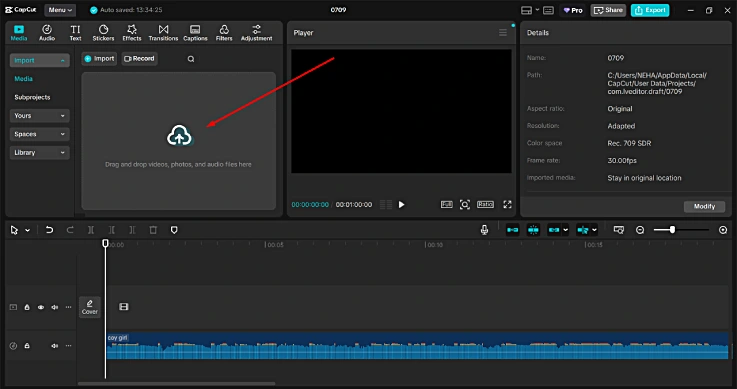
Step 1: Import Video
The first step is to import the video you want to enhance. Open Capcut and upload your low-resolution video to the platform. Once your video is uploaded, you will be ready to start the upscaling process.
Step 2: Use the AI Video Upscaler
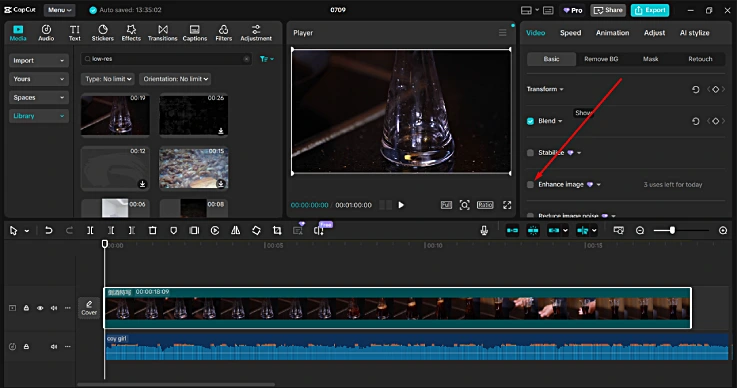
Next, select the Image Enhancer tool from Video > Basic panel. This tool uses artificial intelligence to analyze and upscale your video, improving its resolution and clarity. You can adjust the settings as needed to get the best results for your specific video.
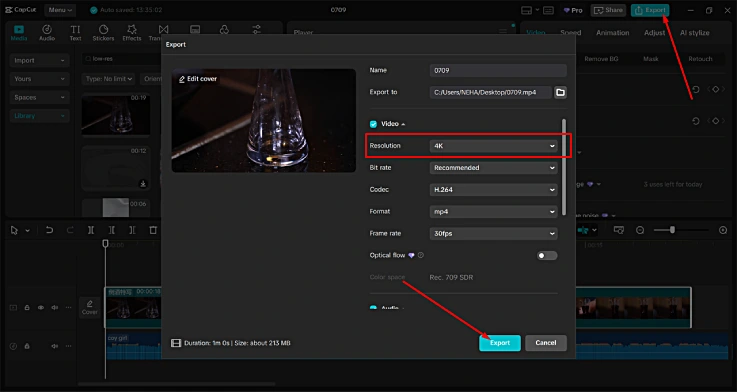
Step 3: Export Video
Once your video is upscaled and you’re happy with the results, it’s time to export the video. Simply click on the export button, and Capcut will process the video, saving it in high-definition quality. You can now share your enhanced video on social media, use it for business presentations, or include it in your creative projects.
Why AI Tools Are the Future of Video Creation
The use of AI in video creation is revolutionizing the way videos are made. Whether you are enhancing the quality of old footage, creating a new video, or adding voiceovers and audio elements, AI tools are making the entire process faster, more efficient, and more accessible. With AI-powered tools like an AI voice generator, AI video upscaler, and text to speech AI, content creators no longer need to rely on expensive software or professional studios to create high-quality videos.
These AI technologies are not just for professionals; they are accessible to everyone. Whether you are a hobbyist looking to improve your personal video collection, a small business owner aiming to create high-quality promotional content, or a social media influencer wanting to make your videos stand out, AI tools can help you create stunning, high-definition videos without the need for technical expertise.
Conclusion
In conclusion, AI is transforming the way we create and enhance videos. From AI video upscalers that turn low-res videos into high-def masterpieces to AI voice generators that add realistic voiceovers, AI is making it easier for everyone to create professional-quality content. Tools like Capcut’s AI video upscaler and text to speech AI are accessible and user-friendly, helping creators save time and improve the quality of their videos.
If you’re looking to enhance your video content, it’s time to embrace the power of AI. With just a few clicks, you can turn your low-resolution videos into stunning, high-definition works of art that are sure to impress your audience.