You spent hours perfecting your track; the promo video should feel just as original. Too many Revid.ai clips land polished yet generic—and you still end up uploading assets by hand.
We can do better.
In the next few minutes, we’ll compare seven AI platforms built for musicians who want visuals that hit on the one. You’ll see what each tool costs, how fast it renders, and where it shines—so you can go from MP3 to share-ready MP4 without filler frames.
Creators in 2026 care about three things: true beat sync, fresh visuals, and speed. That’s how we picked this lineup.
Ready to swap canned b-roll for motion that grooves with your mix? Keep reading.
Neural Frames: best for independent musicians who want full creative control
Neural Frames was built for indie artists: its engine splits every track into eight stems, drives audio-reactive effects, and exports a crisp 4K master ready for YouTube, TikTok, or Spotify Canvas. That full studio workflow now lives in an AI music video creator for independent musicians that listens to your track, catches every kick and snare, and paints a moving canvas from scratch. This is Neural Frames.
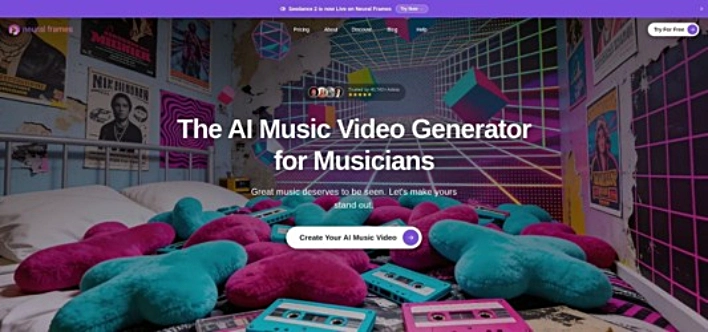
Neural Frames AI music video generator interface with audio-reactive timeline.
The service offers two clear paths. Drop your song into Autopilot, choose a visual style, and a full video is ready before your coffee cools. Or open the advanced timeline and tweak each frame until every snare hit triggers the exact flare you imagined in the studio.
Community adds momentum. More than 2 million videos have been created by thousands of artists, so you’re never experimenting alone.
Quality keeps pace with ambition. undefined
Pricing suits serious hobbyists: start with a free, watermarked trial, then move to plans from $13 a month for watermark-free HD and 4K.
Where Revid relies on stock clips, Neural Frames invents every frame. If you want a tireless video director that speaks your musical language, start here.
Kaiber: best for cinematic AI animations that feel straight out of a music video shoot
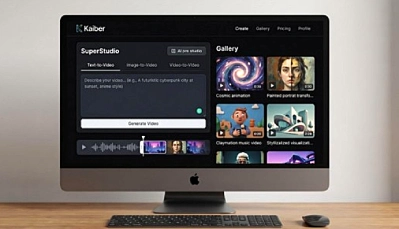
Kaiber swaps stock motion graphics for shots that look storyboarded by a film director. Type a prompt, feed it a still image, or even hum a melody, and the engine returns sequences rich with atmosphere: anime flourishes, dream-like pans, and full-on cinematic vistas.
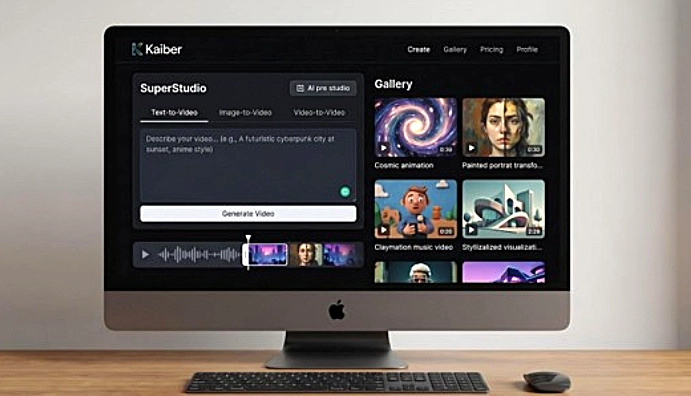
Kaiber cinematic AI video studio interface for music video-style animations.
The tool earned credibility when Linkin Park used it to animate the “Lost” video in 2023. That single drop moved Kaiber from niche curiosity to headline act. Since then, artists have leaned on its image-to-video mode to breathe life into album art, tour posters, and social teasers.
Kaiber listens to audio, but visuals come first. Upload your track and the software nudges motion to match mood shifts; you still handle precise cuts in the scene board. That trade-off gives storytellers wide freedom. Chain several eight-second clips, each with a different prompt, and stitch a mini-film that evolves with the song.
Output tops at 1080p by default, with an optional upscale for higher resolution. Quality stays high because Kaiber renders in discreet chunks, so you can reroll a single segment without re-rendering the whole timeline.
Let’s talk money. Kaiber keeps a free tier for testing, then jumps to the Creator plan at $29 a month. Heavy users move to Pro at $99, which unlocks larger credit pools for longer videos. Credits burn per second of generation, so a four-minute epic needs a bigger wallet than a Spotify Canvas loop.
Two caveats matter. First, expect a learning curve: prompting the right art style takes trial and error. Second, user reviews note occasional billing hiccups and slow support. The company has promised to improve both, but they matter if you run tight deadlines.
If your next release needs visuals worthy of a big-budget animation studio, Kaiber can deliver without the six-figure invoice. Just set aside time to experiment and watch your credit meter.
WZRD: best for instant, trippy visualizers and live DJ sets
Need visuals in a hurry? WZRD is the plug-and-play visualizer that turns any track into a pulsing abstract world without a timeline.
Upload your song, pick a style (neon tunnels, liquid fractals, cyber mandalas), and WZRD’s audio engine maps each kick, snare, and bass sweep to color shifts and camera moves. The preview appears almost as soon as the file finishes uploading, so you can tweak in real time while the mix loops in the background.
The tool shines on stage. Many DJs keep WZRD on a side laptop, feeding HDMI to venue screens. Because scenes render live, visuals stay locked to tempo even if you nudge playback speed mid-set.
Exports currently top out at 1080p. Downloads are clean and watermark-free once you join a paid tier. Pricing stays friendly: about $10 a month buys unlimited previews and a generous block of download minutes. It’s a low-risk way to lift Bandcamp uploads or TikTok teasers.
Know the trade-offs. WZRD’s art leans abstract, perfect for vibe but weak for story. There is no caption layer, no character rig, and no 4K option yet. If you need fast motion that follows the beat, WZRD hits the mark.
BeatViz: best all-in-one “AI director” for rapid song-to-video workflows
Imagine dropping a demo into an app and watching it storyboard itself: scenes, captions, and optional voiceovers, all timed to the chorus. That’s BeatViz.
The dashboard is clean. Upload a track or let the built-in music generator craft one from a text prompt. Within seconds BeatViz slices the audio into verses, hooks, and bridges, then drafts a visual arc that mirrors each section’s energy. Scenic drop at the one-minute mark? BeatViz cues a wide-shot swoop on the downbeat.
Open the storyboard view and every scene sits on a timeline you can drag, trim, or replace. Swap an AI background, adjust lyric placement, or ask the assistant to “make this part glitchier.” Edits ripple forward automatically, so you refine without losing sync.
Speed is the draw. A three-minute 1080p render often finishes in about five minutes. Batch mode lets you export five alternate styles before lunch, useful when a label wants options.
Starter credits are free, watermarked, and perfect for quick proofs of concept. Paid plans start at $25 a month, remove watermarks, and raise resolution to crisp 1080p. A 4K upgrade sits on the public roadmap. Because pricing is time-based, you pay for minutes rendered, not vague tier limits.
Limitations? The template library still favors mainstream genres, so avant-garde requests may need extra tweaking. And while the voiceover tool is fun, most musicians disable it and stick to lyrics or pure visuals.
If you juggle deadlines and need a reliable co-pilot that handles both soundtrack and storyboard, BeatViz delivers a full-service AI director in one browser tab.
One More Shot: best for Spotify Canvas loops and social promos
Ever stared at the silent gray behind your track on Spotify and wished it moved? One More Shot fixes that with a single upload.
Drop your song into the Canvas generator and the app finds an eight-second stretch that hooks the ear. In seconds it morphs your cover art—or a fresh AI render—into a seamless vertical loop that rides the beat and restarts without a hiccup.

One More Shot AI Spotify Canvas and social promo generator dashboard.
The same engine scales up for full videos. Switch to “Storyboard” mode to stretch those AI visuals across the entire song, tweak frame timing, or swap in user shots for key moments. Real-time preview means every edit updates instantly, so you see exactly how the chorus burst lands before exporting.
Social chores disappear. Connect your Spotify for Artists, TikTok, or Reels accounts, set a post time, and the app pushes the clip live while you track mixes or sleep.
Pricing is still settling as the product leaves beta. Early adopters get a generous free tier for Canvas loops and lower monthly rates once they cross export limits. Official plans are expected to land between $20 and $40 a month, roughly the cost of one freelance motion pass.
If your release schedule needs looping visuals across every platform with minimal effort, One More Shot keeps your promo machine running while you write the next hook.
Runway Gen-2: best for custom hero shots and AI-first storytelling
Sometimes a track needs visuals no stock folder can match—think cyberpunk alleyways, floating neon koi, or a dancer who never existed. Runway’s Gen-2 model steps in for moments like these.
Type a prompt, press generate, and the engine creates a 4- to 8-second clip that looks straight off a film set. Feed it a reference image and it animates that still into motion. Stack these bite-size scenes on a timeline, drop the song underneath, and trim until every downbeat shows a fresh angle.
Because Gen-2 focuses on perfecting each shot, you control pacing. Want the bridge washed in sunrise tones? Generate a new clip with that brief and swap it in. Runway’s built-in editor lets you mask, grade, and even in-paint without leaving the browser, so you never juggle apps.
Pricing starts free with 125 credits. The $12 tier raises the cap, but a full three-minute video burns credits quickly, so plan hero shots first and filler later. Resolution lands just shy of full HD, with a one-click upscale available.
Gen-2 isn’t audio reactive by default; you align clips manually, similar to classic editing. The extra effort pays off when you need visuals no one else on YouTube can duplicate. If originality tops your list and you enjoy directing scene by scene, Runway hands you a limitless backlot.
FlowShorts: best for rapid shorts creation and hands-free auto-posting
FlowShorts treats short-form content like a production line: script in, three finished videos out the other side, already queued for TikTok, Reels, and YouTube Shorts.
The workflow is simple. Paste a hook or let the AI write one, pick a template, and watch FlowShorts generate custom visuals, layer ElevenLabs narration, and burn captions on the beat. Because scenes come from fresh AI imagery rather than stock clips, every reel stands out in crowded feeds.
The magic shows up after render. Connect your social accounts once, set a schedule, and FlowShorts handles uploads, thumbnails, and hashtags while you sleep. For creators chasing daily posts, that automation saves hours.
Try the first video free. After that, the starter plan is $19 a month for eight posts, with bulk tiers that push the cost per video below a latte. There is no credit math to track—just clear video counts that make budgeting easy.
FlowShorts is not built for full-length music videos, but if you need a steady stream of polished, voice-driven shorts that hit three platforms automatically, this tool keeps your feed active without extra effort.
Honorable mentions: solid tools that missed the cut
Plenty of AI video generators promise quick results, but they fall outside our brief of “music-first, stock-free visuals.” Three still deserve a respectful nod before we wrap.
Pictory turns long scripts or blog posts into narrated videos faster than you can brew a pot of coffee. The trade-off is heavy reliance on stock libraries and voiceovers, so the final output feels more like a slideshow than a music visual.
Synthesia focuses on AI avatars. Need a presenter to explain patch notes or read lyrics on screen? It shines. Need motion that dances with your bassline? That isn’t its lane.
Rotor Videos was an early favorite among indie bands. It still spits out performance-style edits, but the core engine shuffles royalty-free clips rather than inventing new scenes. In 2026, that looks dated next to the generative options above.
Conclusion
Each of these platforms succeeds in its own category, yet none solves the problem this guide set out to fix: original, audio-driven visuals without the stock footage crutch.
FAQ: choosing the right AI music video tool
Are AI-generated music videos truly “original,” or will they feel recycled?
Yes. These engines generate frames from noise, not a stock folder, so no one else receives the same clip. Originality, however, does not guarantee full copyright clearance. Check each platform’s usage policy before you hit publish.
Will these tools sync to any genre or only four-on-the-floor dance beats?
They handle most genres. Audio-reactive engines such as Neural Frames and WZRD read tempo, amplitude, and section changes, so anything with a clear pulse—from trap to prog rock—lands on the beat. Ambient or free-time pieces still work, but you may need to nudge scene timing.
How do aspect ratios work when one song lives on six platforms?
Almost every tool lets you choose an aspect ratio at export. Create a 16:9 master for YouTube, then punch out a 9:16 crop for Shorts in the same session. Because the visuals are AI-rendered, there are no baked-in edges or watermarks to fight. Keep key elements inside the center safe zone so nothing important gets trimmed.
Is an AI subscription cheaper than hiring a motion designer?
For indie budgets, yes. A mid-tier plan averages $25 to $40 a month, the cost of a single freelance revision hour. You also gain unlimited drafts, so you can tweak until the snare kick feels right without extra fees.
Does AI end the need for human videographers?
No. Think of these tools as idea accelerators. They get you about 80 percent to a solid visual, fast. Many pros then layer live-action footage, advanced compositing, or narrative editing on top. AI widens the creative field; it doesn’t fence professionals out.
words Al Woods